Authentication
Secure your MCP server with OAuth 2.1, API keys, or JWT tokens. Understand authentication vs authorization, PKCE, scopes, and token-based access control. Integrate with Better Auth, Clerk, Auth0, or WorkOS.
For the complete documentation index, see llms.txt. Markdown variants of every page are available by appending .md to the URL.Overview
MCP provides authorization capabilities at the transport level, enabling clients to make requests to restricted servers on behalf of resource owners. The authorization mechanism is based on OAuth 2.1 and implements several related standards.
Quickstart
xmcp provides authentication plugins that handle the entire OAuth flow, enabling login requirements and role-based access control for your tools.
When do you need authentication?
Some MCP servers can operate without authentication. The decision depends on how your server is deployed and what it exposes.
HTTP-based MCP servers that are deployed remotely should implement authentication. When your server is accessible over the network, you need to verify who is making requests before granting access to tools and resources. This applies to servers deployed on platforms like Vercel, AWS, or any cloud provider, as well as self-hosted servers exposed to the internet.
STDIO-based MCP servers running locally on a user's machine can typically skip authentication. Since the server runs in the user's own environment with their permissions, the user is implicitly trusted. Instead of OAuth, these servers should retrieve any needed credentials from environment variables or local configuration files.
The key distinction is trust and exposure. A local STDIO server inherits trust from the user's operating system. A remote HTTP server is exposed to the network and must establish trust through authentication before processing requests.
Authentication vs authorization
Authentication confirms a user's identity. Authorization controls what that user can access. Every request to your MCP server raises two questions: who is making this request, and what are they allowed to do?
Not every server needs complex authorization. Sometimes a valid credential is enough to grant access. Other servers require fine-grained control: different permissions for different users, or access restricted to specific tools.
OAuth handles both authentication and authorization through tokens and scopes. For simpler needs, xmcp provides alternatives like API keys and JWTs.
API Keys are static credentials included in each request. They work well for server-to-server communication or internal services where you control both ends.
JSON Web Tokens are self-contained tokens that carry user claims like identity and roles. They're useful when you manage authentication externally and want to pass verified user information to your MCP server.
How MCP authentication works
MCP authentication is built on OAuth 2.1 with mandatory PKCE (Proof Key for Code Exchange). PKCE is a security extension that protects the authorization flow. This makes authentication secure even for public clients like desktop apps and CLI tools that are not designed for persistent secret storage.
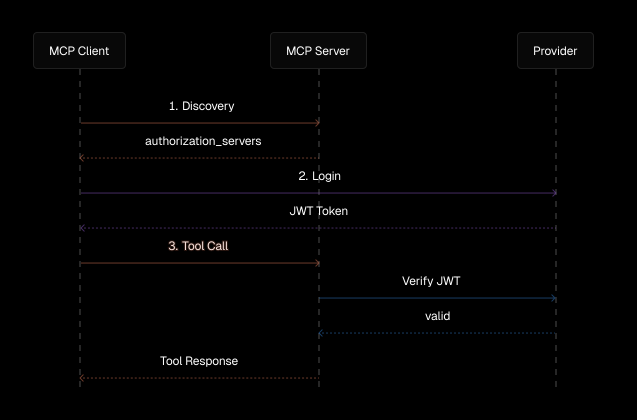
Discovery
When an MCP client first connects to an authenticated server, it needs to discover where and how to authenticate. This happens through a two-step process: first finding the authorization server, then retrieving its configuration.
Resource Discovery
The client starts by fetching the Protected Resource Metadata from /.well-known/oauth-protected-resource. This document tells the client which authorization server handles authentication for this MCP server.
Authorization Server Discovery
Next, the client retrieves the authorization server's configuration. For a server at https://auth.example.com/tenant1, the client tries these endpoints in order:
https://auth.example.com/.well-known/oauth-authorization-server/tenant1https://auth.example.com/.well-known/openid-configuration/tenant1https://auth.example.com/tenant1/.well-known/openid-configuration
For servers without a path component (like https://auth.example.com), the client tries:
https://auth.example.com/.well-known/oauth-authorization-serverhttps://auth.example.com/.well-known/openid-configuration
The authorization server metadata includes the authorization_endpoint where users sign in and the token_endpoint where clients exchange authorization codes for access tokens.
Client registration
Before a client can authenticate users, it needs to identify itself to the authorization server. MCP supports three approaches:
Client ID Metadata Documents are the recommended approach. Clients host a JSON document at an HTTPS URL that describes their identity, name, and allowed redirect URIs. The URL itself becomes the client ID, eliminating the need for pre-registration.
A Client ID Metadata Document looks like this:
The URL where this document is hosted becomes the client ID. Authorization servers that support this approach advertise client_id_metadata_document_supported: true in their metadata.
Dynamic Client Registration allows clients to register automatically by making a request to the authorization server. This creates a unique client ID for each installation.
User authentication
Once the client knows where to authenticate, it redirects the user to the authorization server's login page. The user signs in with their credentials and grants the client permission to access the MCP server on their behalf.
PKCE protects this flow by generating a unique code verifier for each authentication attempt. The client sends a hashed version of this verifier with the authorization request and proves possession of the original when exchanging the authorization code for tokens. This ensures authorization codes remain secure even if intercepted.
Token-based access
After successful authentication, the client receives an access token. This token is included in every request to the MCP server via the Authorization: Bearer header. The server validates the token and extracts user information to authorize the request.
Tokens are bound to the specific MCP server using the resource parameter during authentication. This ensures tokens issued for one server remain valid only for that server, protecting against token confusion attacks.
Resource indicators
MCP clients must include the resource parameter (RFC 8707) in authorization and token requests. This parameter identifies the specific MCP server the token is intended for:
The resource parameter provides critical security benefits:
- Audience binding: Tokens are bound to a specific MCP server and are valid only for the intended server
- Token confusion prevention: Ensures tokens issued for one server remain valid only for that server
- Server validation: MCP servers must validate that tokens were specifically issued for them
When making authorization requests, clients include the MCP server's canonical URI as the resource parameter. The authorization server embeds this in the token, and the MCP server validates it before processing requests.
Scopes
Scopes define what an access token is allowed to do. They act as permissions that limit the capabilities of a token, even for an authenticated user.
When a client initiates authentication, it requests specific scopes like read, write, or admin. The authorization server includes the granted scopes in the access token. Your MCP server can then check these scopes before allowing certain operations.
Scopes are particularly useful when:
- Different clients need different permission levels
- You want to limit what third-party integrations can do
- Users should be able to grant partial access to their account
The MCP server advertises its supported scopes in the protected resource metadata, and clients can request specific scopes during the authorization flow.
For example, a token with only the read scope could access tools that fetch data but would require additional scopes to use tools that modify data. This provides fine-grained access control beyond simple authentication.
When initiating authentication, clients determine which scopes to request using this priority order:
- Use the
scopeparameter from theWWW-Authenticateheader if the server provided one - Request all scopes listed in
scopes_supportedfrom the Protected Resource Metadata - Omit the scope parameter entirely if
scopes_supportedis not defined
This strategy ensures clients request appropriate permissions based on what the server advertises.